WhatsApp CRM (WA CRM)
Automate Customer
Service
Without Losing the Human Touch
Centralize customer conversations, track sales opportunities, automate responses, and improve team collaboration — all in one powerful WhatsApp CRM system.
— Powered By BotBulk Company
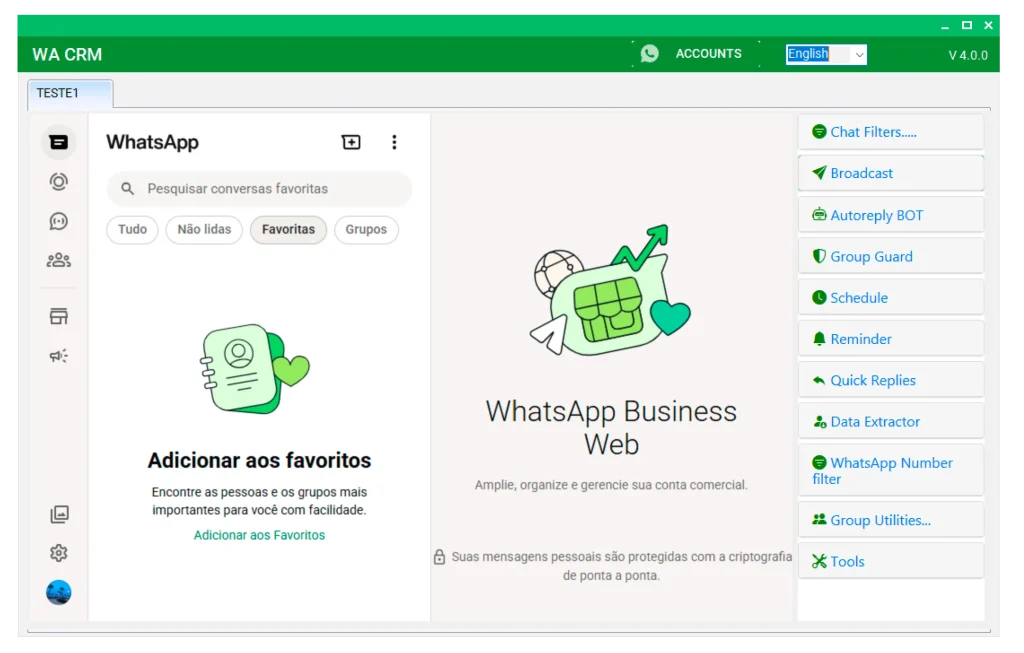
Powerful Features of WhatsApp CRM (WA CRM)
Everything you need to organize chats, track leads, and streamline your WhatsApp sales process from one powerful CRM platform.

Smart Chatbot
Create automated conversation flows that answer FAQs, capture lead details, and route complex chats to the right team member instantly.

Quick Replies
Save time with reusable message templates and send personalized responses instantly using dynamic variables and smart placeholders.

Scheduled Follow-ups
Schedule reminders, follow-ups, and future messages in advance to maintain consistent communication with leads and customers.

Contact Labels & Tags
Organize contacts with custom labels to segment audiences, track customer stages, and manage your pipeline more efficiently.

Analytics Dashboard
Monitor response times, chat volume, and agent performance with clear insights to improve customer service operations.

Team Collaboration
Collaborate through a shared inbox where conversations can be assigned, managed, and tracked without confusion.

Bulk Messaging
Send messages to contacts, unsaved numbers, and groups with support for text and multimedia attachments.
Chat Filters
Sort conversations by unread, groups, pending replies, or activity status to stay organized and productive.

Delay Control
Adjust message intervals and sending behavior to maintain account safety and reduce potential restrictions.
Multi-Account Support
Manage multiple WhatsApp accounts from one platform and apply automation settings across all connected numbers.

Group Tools
Join, manage, clean inactive groups, extract members, and monitor spam activity with advanced group controls.

Data Tools
Extract contact data, generate WhatsApp links, and use built-in utilities to streamline daily CRM tasks.
Choose Your Plan For WhatsApp CRM (WA CRM)
All plans provide the same core CRM functionality. The only difference is in licensing options, user limits, and account scalability.
Single PC
$45
- 1 License For 1 Year
- Perfect for individual use
- Unlimited messages/day
- All premium features
- Personalization & automation
- Media attachments support
- Single-System Activation – No Transfer
- Customer Support
- Free Updates
Single PC
$90
- 1 Lifetime License ⭐
- Best Value for Long-Term Use ⭐
- Unlimited messages/day
- All premium features
- Personalization & automation
- Media attachments support
- Single-System Activation – No Transfer
- Customer Support
- Free Updates
Reseller
Custom Pricing
- 100 License Keys ⭐
- License Valid for 1 Year or Lifetime ⭐
- Unlimited messages/day
- All premium features
- Personalization & automation
- Media attachments support
- Single-System Activation – No Transfer
- Customer Support
- Free Updates
Why Choose WA CRM?
Discover how intelligent automation, lead management, and team collaboration tools help you close more deals and scale efficiently.
WhatsApp CRM provides a smooth and fully integrated customer relationship management experience directly within WhatsApp. This innovative tool transforms the way you interact with customers by combining powerful CRM capabilities with one of the world’s most popular messaging platforms.
Built as a Windows-based desktop application, WhatsApp CRM runs on your computer and becomes your powerful assistant for marketing, sales, and customer management.
With advanced CRM features, you can easily manage contacts, conversations, and conversions all in one centralized dashboard. Designed for professionals, it offers smart contact organization, real-time message tracking, customizable templates, automated reminders, and advanced scheduling to ensure no opportunity is missed.
Whether you are a freelancer, small business owner, or corporate manager, WhatsApp CRM by BotBulk is an essential tool to strengthen customer relationships and achieve outstanding results in today’s digital business environment.
WhatsApp CRM empowers businesses to centralize customer conversations, automate follow-ups, and improve team collaboration — all from one unified dashboard.
By turning chats into organized leads and actionable opportunities, it helps teams close more deals, respond faster, and manage customer relationships more efficiently.
Designed for scalability and performance, the platform reduces manual work while increasing productivity and sales visibility.
🚀 Centralized Customer Management
Keep all WhatsApp conversations, leads, and customer data organized in one unified dashboard for better visibility and control.
⚡ Faster Response Times
Automate replies, assign chats to team members, and reduce manual work to respond to customers more efficiently.
📊 Improved Sales Tracking
Monitor leads, track opportunities, and manage sales pipelines to turn conversations into measurable revenue.
👥 Enhanced Team Collaboration
Assign conversations, leave internal notes, and collaborate seamlessly within a shared CRM workspace.
🔐 Better Data Organization
Use tags, labels, and advanced filters to segment customers and manage communication more strategically.
WhatsApp CRM transforms the way your business manages customer interactions by centralizing conversations, improving team collaboration, and automating follow-ups.
It reduces manual workload, increases response speed, and helps your team convert more leads into paying customers.
With better visibility into conversations and sales opportunities, you gain actionable insights that drive smarter decisions and sustainable business growth.
WhatsApp CRM is designed with a clean and intuitive interface that makes managing conversations, leads, and teams simple and efficient.
You can set up automation, assign chats, and track customer interactions without technical expertise — all from one centralized dashboard.
WhatsApp CRM (WA CRM) is optimized for Windows desktop environments. To ensure smooth performance and stable operation, your system should meet the following minimum requirements:
Minimum Requirements:
• Operating System: Windows 10 / Windows 11
• Processor: Intel i3 or equivalent (Recommended i5 or higher)
• RAM: Minimum 4GB (Recommended 8GB)
• Storage: At least 2GB free disk space
• Internet Connection: Stable and active connection
Recommended Requirements:
• Windows 11
• 8GB RAM or higher
• SSD Storage
• High-speed internet for large-scale campaigns
How It Works?
Get started in minutes, not days
Connect WhatsApp
Scan the QR code to link your WhatsApp account securely
Set Up Automation
Create chatbot flows and quick reply templates
Import Contacts
Bring your existing contacts or capture new leads
Start Converting
Watch your response time drop and sales increase
See WhatsApp CRM (WA CRM) in Action
Watch how businesses are automating their customer service and boosting sales
😰 Drowning in Messages?
- Customers waiting hours for a simple reply
- Lost sales because you couldn't respond in time
- Repeating the same answers over and over
- No way to follow up automatically
- Missing leads while you sleep
✅ WA CRM Changes Everything
- Instant replies with intelligent chatbot
- Quick reply templates for common questions
- Scheduled follow-ups that never forget
- 24/7 automated customer support
- Convert leads while you focus on growth
How to Buy & Activate WA CRM?
Get started with any of our tools in three simple steps.
Enter the received license key in the software and start using it.
Download the software from the official link and install it on your Windows PC or laptop.
Choose your payment method and send the payment confirmation via WhatsApp.
Frequently Asked Questions
Get answers to common questions about WA CRM
What is WhatsApp CRM and What Is It Used For?
WhatsApp CRM is a customer relationship management software designed specifically for WhatsApp. It helps businesses organize customer conversations, automate responses, track chat history, and manage interactions more efficiently.
With this tool, you can centralize all messages in one dashboard, assign conversations to team members, use automated replies, and monitor customer engagement in real time. WhatsApp CRM is built to improve productivity, streamline communication, and enhance customer relationships for growing businesses.
Why Do We Need WA CRM?
When dealing with multiple customers on WhatsApp, manual message management quickly becomes inefficient. A WhatsApp CRM system helps you organize chats, automate follow-ups, assign conversations to team members, and track customer interactions — all from one centralized platform.
It saves time, improves team productivity, and turns everyday conversations into measurable business opportunities.
How Does the Chatbot Work?
Our chatbot is built with a visual flow builder that allows you to design automated conversation paths without any coding. You can create smart response sequences based on keywords, user actions, or message triggers.
Set up instant replies for frequently asked questions, collect customer details through interactive flows, and automatically route complex conversations to the right team member.
With a simple drag-and-drop interface, you can build and customize chatbot workflows in minutes — making automation easy, flexible, and fully controllable.
Is This Safe for My WhatsApp Account?
Yes. WA CRM is built with account security and stability as top priorities. The system follows smart rate control mechanisms and optimized automation behavior to reduce the risk of restrictions.
All features are designed for legitimate customer management and business communication — not spam activities. Thousands of businesses rely on WA CRM daily to manage their conversations safely and efficiently.
Do I Need Any Technical Knowledge?
No technical expertise is required. WA CRM is designed with a simple and intuitive interface so anyone familiar with WhatsApp can easily use it.
We provide step-by-step video tutorials to guide you through setup and configuration. In addition, our support team is available to assist you and ensure a smooth onboarding experience.
What payment methods do you accept?
We accept payments via USDT (Tether) and selected cryptocurrencies. After payment confirmation, your license key will be delivered for activation.
How do I activate my license?
After purchase, you will receive a license key. Enter it inside the software to activate your account and unlock full features.
