Warm Up Your WhatsApp
Line for
Safe & Powerful
Messaging
Prepare new or inactive WhatsApp lines with smart automation, natural activity simulation, and performance boosting tools — ready for bulk campaigns.
— Powered By BotBulk Company
Powerful Protection Features of WA Hammer
Everything you need to boost line strength and prepare your WhatsApp account for powerful campaign execution.
Multi-Account Warm-Up
Warm up multiple WhatsApp lines simultaneously and manage all number statuses in one unified interface.

Line Warm-Up Engine
Prepare new or inactive WhatsApp accounts by simulating natural engagement to avoid algorithm sensitivity and reduce ban risk.

Phonebook Extraction
Extract all WhatsApp-enabled contacts from your mobile phone and export them for warm-up or later use.

Chat History Export
Generate a list of all chat records and export them for tracking, analysis, or contact reuse.

Single-Message Sender
Send WhatsApp messages one-by-one without saving numbers, perfect for testing and account strengthening.

Natural Activity Simulation
Simulate gradual, realistic messaging behavior — replies, interaction patterns, and delays — to build trust with WhatsApp’s algorithm.

Bulk Messaging Prep
Prepare lines before sending bulk messages by increasing trust and reducing algorithm flags through phased warm-up.
Contact List Export
Export your extracted contacts into Excel or CSV format for structured data management.

WhatsApp Line Performance
Improve account credibility and readiness for high-volume messaging with proven algorithms designed for WhatsApp marketing.

Enhanced Account Stability
Warm up and stabilize account activity to ensure long-term reliability and better delivery performance.

Smart Interaction Simulation
Automatically generate interactions and send phased messages to mimic real user engagement behavior.

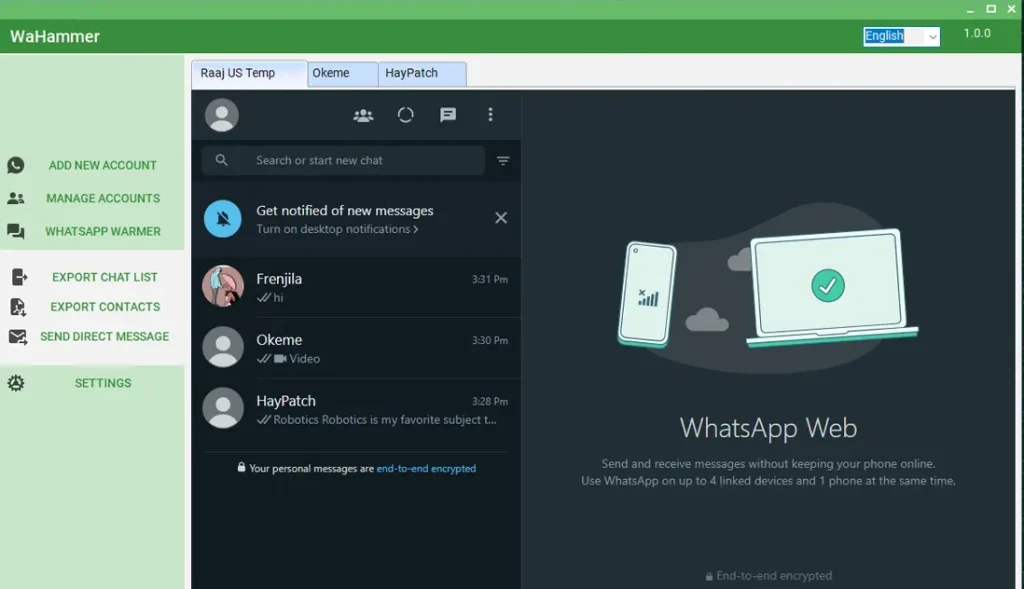
Unified Dashboard Access
View, manage, and monitor all WhatsApp lines and warm-up progress from a single, intuitive dashboard.
See WhatsApp Warmer (WA Hummer) in Action
Browse screenshots to understand how our desktop automation tools work and how you can manage campaigns with ease.
Choose Your Plan For WA Hammer
Every plan includes complete anti-block and protection features. Pricing varies based on licensing and capacity.
Single PC
$45
- 1 License For 1 Year
- Perfect for individual use
- Unlimited
- All premium features
- Personalization & automation
- Single-System Activation – No Transfer
- Customer Support
- Free Updates
Single PC
$90
- 1 Lifetime License ⭐
- Best Value for Long-Term Use ⭐
- Unlimited
- All premium features
- Personalization & automation
- Single-System Activation – No Transfer
- Customer Support
- Free Updates
Reseller
Custom Pricing
- 100 License Keys ⭐
- License Valid for 1 Year or Lifetime ⭐
- Unlimited
- All premium features
- Personalization & automation
- Single-System Activation – No Transfer
- Customer Support
- Free Updates
Why Choose WA Hammer?
See how advanced warm-up tools boost line strength and prepare your account for confident campaign execution.
WA Hammer is a specialized WhatsApp line warm-up tool designed to improve the performance, strength, and reliability of your WhatsApp accounts before running bulk messaging campaigns.
As WhatsApp continues to apply stricter monitoring on newly activated numbers, fresh lines are often placed under higher sensitivity and behavioral review. Sending high volumes of messages without proper preparation can increase the risk of restrictions or limited functionality.
WA Hammer solves this challenge by using advanced automation algorithms to simulate natural engagement and gradual activity growth. The software helps warm up newly activated or inactive WhatsApp lines in a structured way — building credibility, improving stability, and preparing them for high-volume messaging.
Recognized as a powerful tool in the WhatsApp marketing ecosystem, WA Hammer is ideal for businesses and professionals who rely on WhatsApp as a primary communication and outreach channel. Whether you are launching a new number or preparing an existing account for large-scale campaigns, WA Hammer ensures your line is optimized, strengthened, and ready for safe execution.
WA Hammer enables you to warm up WhatsApp lines strategically before launching campaigns. By gradually increasing engagement and simulating real user behavior, it improves line strength, enhances trust signals, and prepares your account for scalable messaging.
• Safely warm up newly activated WhatsApp lines
• Reduce sensitivity associated with fresh numbers
• Improve line strength and credibility signals
• Prepare accounts for high-volume messaging
• Build natural engagement patterns over time
• Increase campaign stability and delivery reliability
• Minimize the risk of sudden restrictions
• Manage multiple lines from one dashboard
WA Hammer enables businesses to scale WhatsApp marketing more safely by strengthening account foundations before high-volume activity begins. This proactive preparation protects campaign continuity, preserves communication channels, and supports long-term messaging performance.
WA Hammer is designed with a clean and intuitive interface that allows users to warm up and manage multiple WhatsApp lines without technical complexity. The setup process is straightforward, and activity simulations can be configured in just a few clicks.
Clear status indicators and structured warm-up controls make it easy to monitor progress and adjust settings as needed — ensuring a smooth and efficient preparation process before launching campaigns.
WA Hammer is a Windows-based desktop application. To ensure smooth performance and stable operation, your system should meet the following minimum requirements:
Minimum Requirements:
• Operating System: Windows 10 / Windows 11
• Processor: Intel i3 or equivalent (Recommended i5 or higher)
• RAM: Minimum 4GB (Recommended 8GB)
• Storage: At least 2GB free disk space
• Internet Connection: Stable and active connection
Recommended Requirements:
• Windows 11
• 8GB RAM or higher
• SSD Storage
• High-speed internet for large-scale campaigns
How It Works?
Get started in minutes, not days
Quick Setup
Install WA Hammer and connect your WhatsApp lines easily to begin the warm-up process within minutes.
Start Line Warm-Up
Activate structured warm-up sequences that simulate natural messaging activity and gradual engagement growth.
Monitor Progress
Track account activity, engagement patterns, and warm-up performance through a clear and simple dashboard.
Launch Confidence
Once your line is strengthened and stabilized, proceed with bulk messaging campaigns with improved readiness and reliability.
😰 Struggling with WhatsApp Lines
- New numbers getting flagged too quickly
- Fresh accounts under strict algorithm monitoring
- Low activity levels reducing line credibility
- Campaigns failing due to weak account foundation
- Uncertainty before launching bulk messaging
✅ WA Hammer Prepares Your Line
- Structured warm-up for new and inactive accounts
- Natural activity simulation that builds credibility
- Gradual engagement growth to strengthen stability
- Multi-line warm-up management in one dashboard
- Confidence to launch campaigns at the right time
How to Buy & Activate WA Hammer?
Get started with any of our tools in three simple steps.
Enter the received license key in the software and start using it.
Download the software from the official link and install it on your Windows PC or laptop.
Choose your payment method and send the payment confirmation via WhatsApp.
Frequently Asked Questions
Get answers to common questions about WA Hammer
What is WA Hammer used for?
WA Hammer is a WhatsApp line warm-up tool designed to strengthen new or inactive numbers by simulating natural engagement before running high-volume messaging campaigns.
Why do I need to warm up my WhatsApp line?
New WhatsApp numbers are highly sensitive to algorithm monitoring. Without proper warm-up, sending bulk messages too quickly can increase the risk of restrictions or reduced delivery performance.
How does WA Hammer warm up my line?
The software simulates gradual and natural messaging behavior, increases activity over time, and builds credibility signals to improve account stability before campaign execution.
Can I warm up multiple WhatsApp lines at the same time?
Yes. WA Hammer supports multi-line management, allowing you to warm up and monitor multiple accounts simultaneously from one dashboard.
Does warm-up guarantee that my account won’t be banned?
No tool can guarantee 100% protection. However, proper warm-up significantly reduces risk and improves your line’s readiness for bulk messaging.
What payment methods do you accept?
We accept payments via USDT (Tether) and selected cryptocurrencies. After payment confirmation, your license key will be delivered for activation.
How do I activate my license?
After purchase, you will receive a license key. Enter it inside the software to activate your account and unlock full features.
