
Extract Valuable Contact
Data from Websites
Instantly
NetScraper Data Extractor
NetScraper helps you collect targeted contact data in minutes instead of hours — perfect for lead generation, marketing campaigns, and business research.
— Powered By BotBulk Company
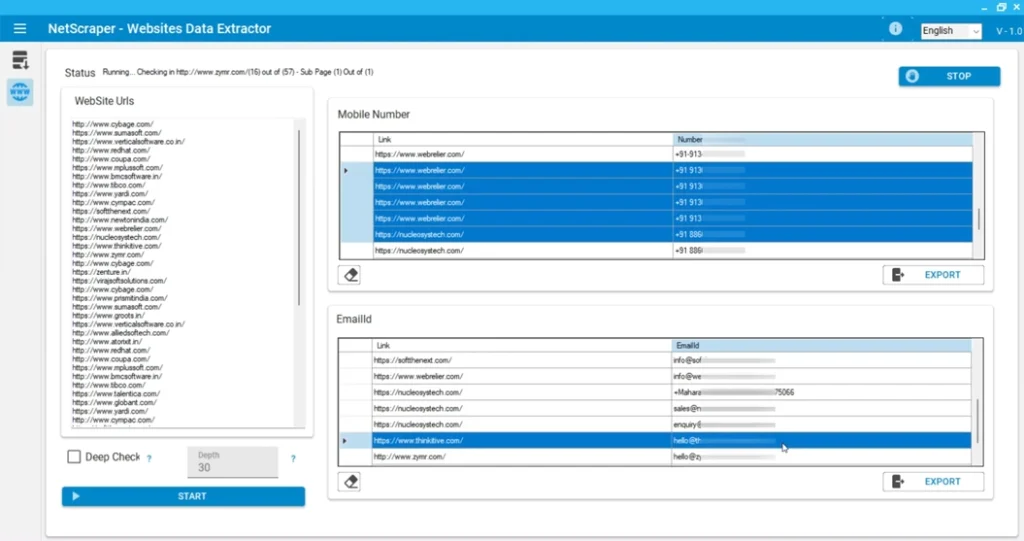
Powerful Features of NetScraper Data Extractor
Everything you need to extract web data, find business contacts, and generate high-quality leads automatically.

Extract Phone Numbers
Automatically scan websites and collect phone numbers from pages, directories, and public contact sections.

Email Address Extraction
Find and extract email addresses from websites and online sources to build reliable contact lists.

Multi-Page Website Crawling
Scan entire websites and follow internal pages to collect deeper contact data automatically.
Targeted Keyword Search
Search websites based on keywords and niches to discover businesses relevant to your market.

Social Media Data Extraction
Collect contact details from social media pages and public profiles connected to business websites.
Bulk Data Collection
Extract hundreds or thousands of contacts automatically without manual searching or copy-paste.
Export to CSV & Excel
Download all extracted data in organized CSV or Excel files ready for marketing or analysis.

Build Targeted Lead Lists
Turn extracted contact data into structured lead lists for outreach campaigns and sales prospecting.

Automated Data Extraction
Save hours of manual work by automatically scanning websites and collecting contact data in seconds with smart extraction technology.
Choose Your Plan for NetScraper Data Extractor
All plans include the same core data extraction features. The difference depends on licensing options and usage permissions.
Single PC
$45
- 1 License For 1 Year
- Perfect for individual use
- Extract phone numbers from websites
- Extract Email from websites
- Full access to all premium features
- Automated data extraction tools
- Export data to CSV / Excel
- Single-System Activation – No Transfer
- Free Updates
Single PC
$90
- 1 Lifetime License ⭐
- Best Value for Long-Term Use ⭐
- Extract phone numbers from websites
- Extract Email from websites
- Full access to all premium features
- Automated data extraction tools
- Export data to CSV / Excel
- Single-System Activation – No Transfer
- Free Updates
Reseller
Custom Pricing
- 100 License Keys ⭐
- License Valid for 1 Year or Lifetime ⭐
- Extract phone numbers from websites
- Extract Email from websites
- Full access to all premium features
- Automated data extraction tools
- Export data to CSV / Excel
- Single-System Activation – No Transfer
- Free Updates
Why Choose NetScraper Data Extractor?
Discover how powerful web data extraction and smart automation help you collect valuable contact information, build targeted lead lists, and grow your outreach faster.
Collecting phone numbers and contact details from websites manually can take hours and often leads to incomplete data. NetScraper is designed to simplify this process by automatically extracting valuable contact information from websites, search engines, online directories, and social media platforms.
This powerful tool allows you to gather phone numbers, email addresses, and other business contact details quickly and efficiently. Instead of browsing pages and copying information one by one, NetScraper scans web sources and collects the data automatically, saving you time and effort.
One of the key advantages of NetScraper is its ability to help you build targeted contact lists for marketing and outreach. Whether you want to generate leads, run email or WhatsApp campaigns, or collect business data for research, the software provides an organized and scalable way to gather contacts.
NetScraper also allows you to target specific countries and languages, making it easier to extract relevant data from the web and build high-quality lead lists tailored to your market.
Overall, NetScraper turns websites and online platforms into a powerful source of contact data, helping marketers, agencies, and businesses discover new opportunities and connect with potential clients faster.
Turn the entire web into a powerful source of business contacts.
NetScraper helps you automatically extract phone numbers, emails, and contact details from websites and online platforms, allowing you to build targeted lead lists faster and eliminate hours of manual searching.
Automatically extract phone numbers, emails, and contact details from websites to build targeted lead lists quickly. NetScraper saves hours of manual research and helps you discover new business opportunities across the web.
Turn web data into real business opportunities.
By automatically collecting contact details from websites and online platforms, NetScraper helps you reach more potential clients, expand your outreach, and accelerate lead generation with less manual effort.
NetScraper is designed with a simple and intuitive interface, allowing users to extract contact data from websites without technical expertise. Just enter your target keywords or sources, start the scan, and the software automatically collects and organizes the results for you.
NetScraper is a desktop application designed to run smoothly on most modern Windows systems.
Minimum Requirements
Windows 10 / Windows 11
4 GB RAM
500 MB free disk space
Stable internet connection
Recommended
Windows 11
8 GB RAM or higher
High-speed internet connection for faster data extraction
How It Works?
Get started in minutes, not days
Enter Keywords\Web
Add your target keywords or website sources to start searching for contact data across the web.
Scan and Extract Data
NetScraper automatically scans websites and collects phone numbers, emails, and other contact details.
Organize & Export
Review the extracted data and export it in CSV or Excel format for easy use in your campaigns.
Start Your Outreach
Use your new contact list for marketing, lead generation, and connecting with potential clients faster.
See NetScraper in Action
Watch how businesses extract contact data from websites and build targeted lead lists faster.
😰 Struggling to Find Contact Online?
- Hours spent searching websites for phone numbers
- Copy-pasting emails and contact details manually
- No organized list of potential clients
- Difficult to find contacts in specific niches
- Missing valuable business opportunities
✅ NetScraper Solves It
- Automatically extract phone numbers and emails
- Collect contact data from websites and directories
- Build organized lead lists in minutes
- Export ready-to-use data for your campaigns
- Reach potential clients faster and grow your outreach
How to Buy & Activate NetScraper?
Get started with any of our tools in three simple steps.
Enter the received license key in the software and start using it.
Download the software from the official link and install it on your Windows PC or laptop.
Choose your payment method and send the payment confirmation via WhatsApp.
Frequently Asked Questions
Get answers to common questions about NetScraper
What is NetScraper used for?
NetScraper is a data extraction tool designed to collect phone numbers, emails, and contact information from websites, online directories, and other web sources automatically.
What type of data can NetScraper extract?
The software can extract various types of contact data such as phone numbers, email addresses, business names, and other publicly available contact details found on websites.
Who should use NetScraper?
NetScraper is ideal for digital marketers, lead generation specialists, sales teams, agencies, and business owners who want to build targeted contact lists from the web.
Do I need technical knowledge to use the software?
No. NetScraper is designed to be simple and user-friendly. You just enter your target keywords or sources and the software automatically scans and extracts the data.
Can I export the extracted data?
Yes. All extracted data can be exported to formats such as CSV or Excel so you can easily use it in marketing campaigns, CRM systems, or outreach tools.
Can NetScraper extract data from any website?
NetScraper can extract publicly available contact information from most websites and online platforms, depending on how the data is displayed on the page.
What payment methods do you accept?
We accept payments via USDT (Tether) and selected cryptocurrencies. After payment confirmation, your license key will be delivered for activation.
How do I activate my license?
After purchase, you will receive a license key. Enter it inside the software to activate your account and unlock full features.
