
Google Maps Data
Extractor
Find Clients Where
They Already Exist With
(G-Extractor)
Extract thousands of targeted business contacts — including phone numbers, emails, websites, and more — in just minutes.
— Powered By BotBulk Company
Powerful Features of Google Maps Data Extractor
Everything you need to find businesses, extract valuable data, and build high-quality lead lists directly from Google Maps.

Target Businesses by Keyword
Search Google Maps using specific keywords to find businesses related to your niche or industry in seconds.
Target Businesses by Location
Extract business data from any city, region, or country and find potential clients exactly where you want to target.
Extract Complete Data
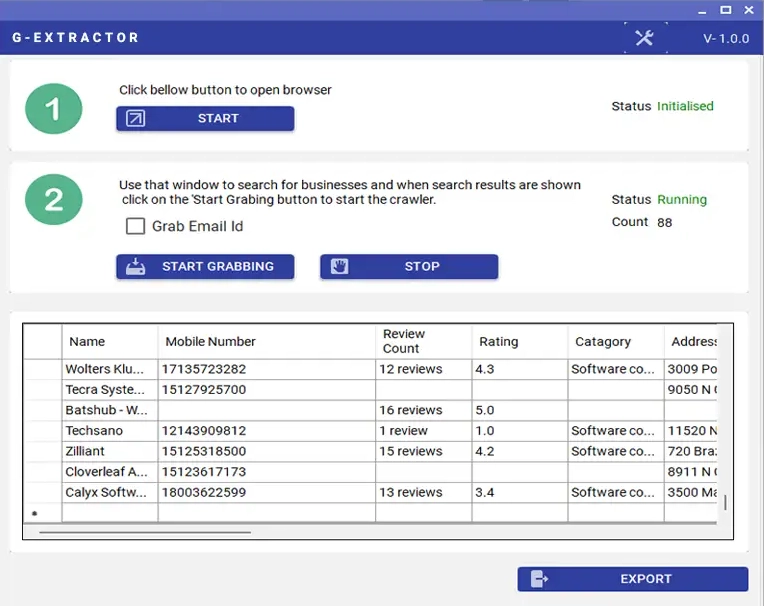
Collect valuable information including business name, phone number, website, address, ratings, and more in seconds.

Build High-Quality Lead Lists
Turn Google Maps search results into structured lead lists ready for sales outreach and marketing campaigns.

Bulk Data Extraction
Extract hundreds or even thousands of business listings automatically without manual copy-paste.
Export to CSV & Excel
Download your extracted data in CSV or Excel format and import it easily into your CRM or marketing tools.
Find Clients in Any City
Discover potential clients in any location worldwide by targeting specific cities, regions, or map areas.

Clean & Organized Data
Get structured, ready-to-use data that helps you quickly analyze markets and identify new opportunities.

Save Hours of Manual
Automate the entire lead discovery process and eliminate the need to manually search and collect business information.
Choose Your Plan For G-Extractor
All plans include the same core data extraction features. The only difference is in licensing options, usage limits, and scalability depending on your needs.
Single PC
$45
- 1 License For 1 Year
- Perfect for individual use
- Unlimited
- All premium features
- Personalization & automation
- Single-System Activation – No Transfer
- Customer Support
- Free Updates
Single PC
$90
- 1 Lifetime License ⭐
- Best Value for Long-Term Use ⭐
- Unlimited
- All premium features
- Personalization & automation
- Single-System Activation – No Transfer
- Customer Support
- Free Updates
Reseller
Custom Pricing
- 100 License Keys ⭐
- License Valid for 1 Year or Lifetime ⭐
- Unlimited
- All premium features
- Personalization & automation
- Single-System Activation – No Transfer
- Customer Support
- Free Updates
See Google Maps Data Extractor (G-Extractor) in Action
Watch how businesses are discovering new clients and building targeted lead lists from Google Maps.
Why Choose Google Maps Data Extractor?
Discover how powerful data extraction and smart filtering help you find local businesses, generate targeted leads, and grow your outreach faster.
Collecting business phone numbers from Google Maps can be an incredibly powerful strategy for finding new customers. Instead of manually searching and copying contact information, G-Extractor automates the entire process and helps you gather valuable business data in just a few minutes.
G-Extractor is designed to extract phone numbers, business names, addresses, websites, and other public business details directly from Google Maps. By simply entering a keyword and location, you can quickly discover hundreds of businesses related to your target market.
This makes it an ideal tool for marketers, sales teams, agencies, and entrepreneurs who want to build targeted lead lists and reach potential clients more efficiently. With accurate and organized data, you can run more focused marketing campaigns and connect with businesses that are actively operating in your niche.
Instead of spending hours collecting leads manually, G-Extractor turns Google Maps into a fast and reliable lead generation system, helping you find and connect with potential customers much more efficiently.
Turn Google Maps into a powerful lead generation engine.
G-Extractor helps you quickly discover and collect real business contact data based on keywords and locations, allowing you to build highly targeted lead lists in minutes instead of hours.
With accurate and organized business information, you can reach the right companies faster, run more effective marketing campaigns, and connect directly with potential clients who already exist in your target market.
Quickly find and extract real business data from Google Maps using keywords or locations.
Build targeted lead lists, save hours of manual searching, and connect with potential customers faster to grow your sales pipeline. 🚀
Access a continuous source of real business leads and expand your outreach with confidence. By turning Google Maps data into organized contact lists, G-Extractor helps you reach more potential clients, increase response opportunities, and accelerate your business growth. 📈
Google Maps Data Extractor (G-Extractor) is designed with a clean and intuitive interface that makes managing conversations, leads, and teams simple and efficient.
Google Maps Data Extractor (G-Extractor) is optimized for Windows desktop environments. To ensure smooth performance and stable operation, your system should meet the following minimum requirements:
Minimum Requirements:
• Operating System: Windows 10 / Windows 11
• Processor: Intel i3 or equivalent (Recommended i5 or higher)
• RAM: Minimum 4GB (Recommended 8GB)
• Storage: At least 2GB free disk space
• Internet Connection: Stable and active connection
Recommended Requirements:
• Windows 11
• 8GB RAM or higher
• SSD Storage
• High-speed internet for large-scale campaigns
How It Works?
Get started in minutes, not days
Search by Keyword
Enter a business keyword and location to find companies listed on Google Maps in your target market.
Extract Business Data
Automatically collect valuable information such as phone numbers, business names, addresses, and websites.
Export Your Leads
Download the extracted data in organized files like CSV or Excel for easy use in your campaigns.
Start Your Outreach
Use your new lead list to run targeted marketing campaigns and connect with potential clients faster.
😰 Struggling to Find New Clients?
- Hours wasted searching for businesses manually
- Copy-pasting contact details one by one
- No structured list of potential customers
- Hard to discover businesses in new locations
- Missing opportunities while competitors move faster
✅ G-Extractor Solves It
- Find businesses instantly by keyword and location
- Extract phone numbers and business contact data
- Build organized lead lists in minutes
- Export ready-to-use data for your marketing
- Reach potential clients faster and grow your business
How to Buy & Activate WA CRM?
Get started with any of our tools in three simple steps.
Enter the received license key in the software and start using it.
Download the software from the official link and install it on your Windows PC or laptop.
Choose your payment method and send the payment confirmation via WhatsApp.
Frequently Asked Questions
Get answers to common questions about Google Maps Data Extractor
What is G-Extractor and how does it work?
G-Extractor is a data extraction tool designed to collect publicly available business information from Google Maps. By entering a keyword and location, the software scans the results and gathers details such as business names, phone numbers, addresses, and websites.
What type of data can G-Extractor extract from Google Maps?
The software can extract several types of business information including:
Business name
Phone number
Address
Website
Business category
Google Maps listing details
This helps you build targeted lead lists for marketing and outreach.
Who should use G-Extractor?
G-Extractor is ideal for digital marketers, lead generation specialists, sales teams, agencies, and business owners who want to find local businesses and build targeted prospect lists.
Can I search businesses in any country or city?
Yes. You can extract business data from Google Maps in any location worldwide by simply selecting the target city, region, or country.
Does G-Extractor export the data to Excel or CSV?
Yes. All extracted data can be exported to common formats such as CSV or Excel, making it easy to import into CRM systems, marketing tools, or outreach campaigns.
What payment methods do you accept?
We accept payments via USDT (Tether) and selected cryptocurrencies. After payment confirmation, your license key will be delivered for activation.
How do I activate my license?
After purchase, you will receive a license key. Enter it inside the software to activate your account and unlock full features.
